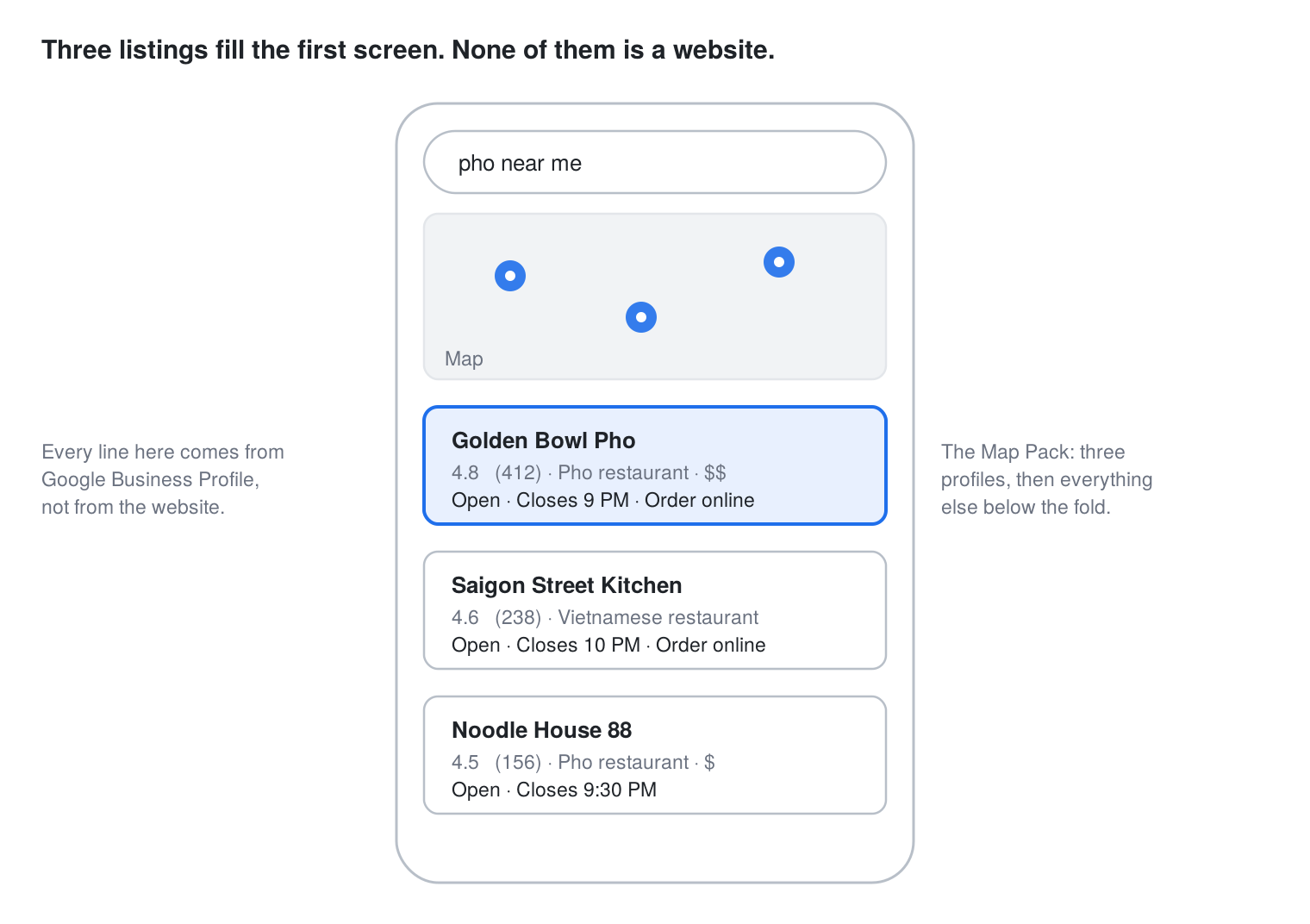
When someone types “tacos near me” or “best pho in Walnut,” Google answers with a map and three restaurants before a single website appears. That block is called the Map Pack, and for an independent restaurant it is the whole game. The three listings in it come from Google Business Profile, not from your website. A restaurant with a beautiful site and a neglected profile is invisible at the exact moment a hungry person is choosing.
This is a working checklist for 2026: twelve items, in the order Google weighs them, including the settings that changed this year. Most take under an hour. Two of them, the ordering link and the review habit, are where we see the biggest gap between restaurants that get found and restaurants that get skipped.
Four terms you’ll see in this post
| Term | What it means in plain English |
| Google Business Profile | The free listing Google shows for your restaurant on Search and Maps: hours, photos, menu, reviews, and the Order online button. You control it at business.google.com. |
| Map Pack | The map with three restaurants under it that Google shows first for searches like “pizza near me.” |
| Third-party app | DoorDash, Uber Eats, Grubhub, and similar. They take a cut of every order. |
| Direct ordering | Customers ordering from your own website or ordering page. No commission, and you keep the customer’s details. |
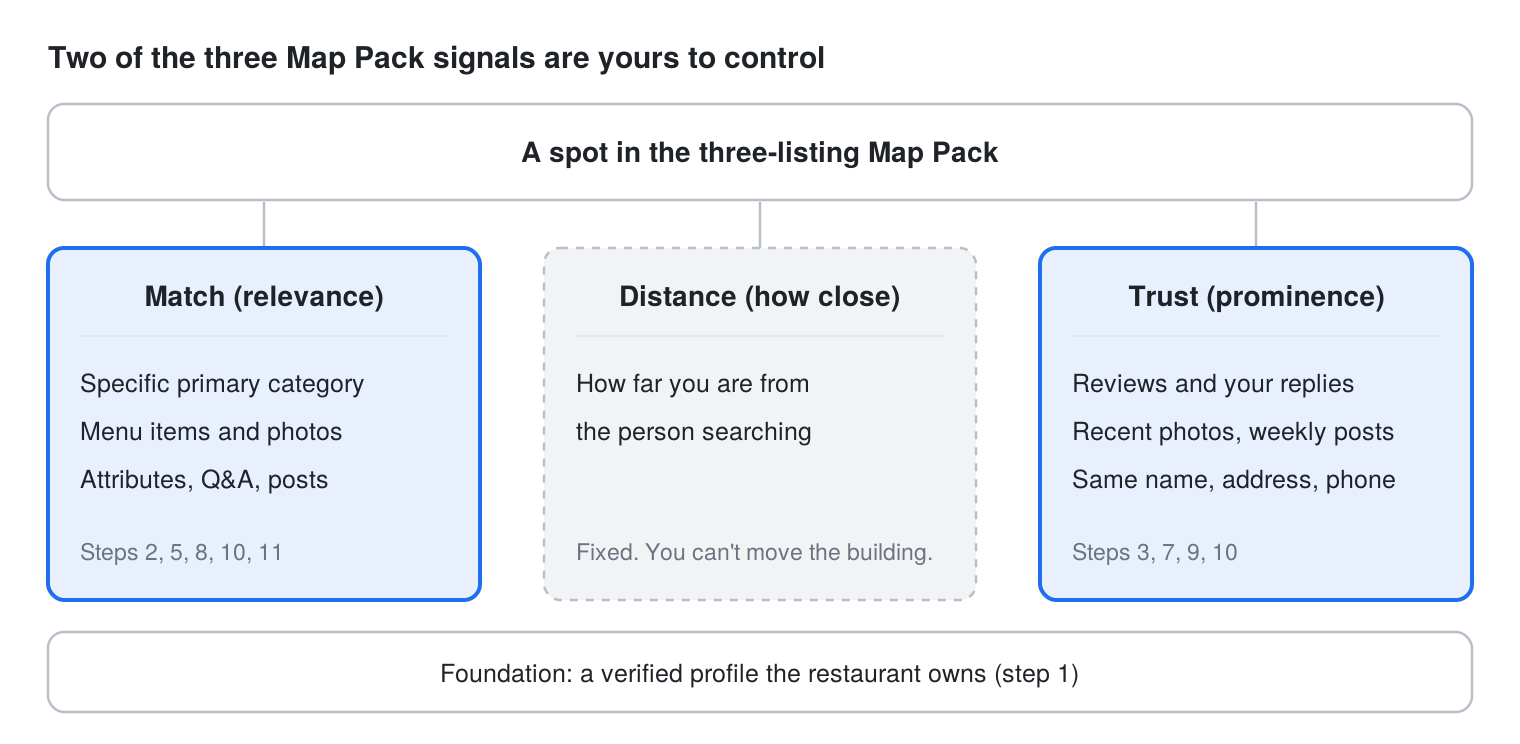
How Google decides who gets the three spots
The checklist, part one: get the foundation right
Claim and verify the listing under an account you control
Search your restaurant on Google Maps. If a listing exists, claim it; if not, create one at business.google.com. Verify it under an email address the restaurant owns, not an agency’s, a former manager’s, or a POS vendor’s. Google now verifies most restaurants by video, so have your signage, interior, and a piece of mail with the address ready. If a previous vendor verified the profile and won’t hand it over, request ownership through Google’s form; it typically takes three to seven days.
Pick a specific primary category
The primary category is the main thing Google uses to decide whether you match a search, and “Restaurant” is the weakest choice you can make. Use the most specific option Google offers: “Pho restaurant,” “Pizza takeout,” “Mediterranean restaurant,” “Bagel shop.” Then add up to nine secondary categories for what you also are: “Caterer,” “Delivery restaurant,” “Breakfast restaurant.”
| Search a customer types | Weak primary category | Strong primary category |
| pho near me | Restaurant | Pho restaurant |
| pizza delivery Walnut | Pizza restaurant | Pizza delivery |
| bagels open now | Bakery | Bagel shop |
| halal food near me | Restaurant | Halal restaurant |
| catering for 50 people | (none) | Caterer, as a secondary category |
primary category they share is the one Google associates with that search.
Make your name, address, and phone identical everywhere
Google cross-checks your profile against Yelp, Apple Maps, Facebook, DoorDash, Uber Eats, and the hundreds of directories that copy them. “Pho Ha Plus” on Google, “Pho Ha Plus Restaurant” on Yelp, and “PHO HA +” on a delivery app read as three different businesses. Pick one exact spelling, one address format, and one phone number, and fix the rest. Do not add keywords to the business name field; Google suspends profiles for it.
Set regular hours, and keep holiday hours a month ahead
Wrong hours are the fastest way to earn a one-star review from someone who drove over. Enter regular hours, then add special hours for every holiday through the end of the year. Profiles without holiday hours show a “Hours might differ” warning, which pushes people to the next listing. If the kitchen closes before the dining room, set separate hours for delivery and takeout.
Use both the Menu link and the Menu editor
Google gives you two menu tools, and the restaurants that rank use both. The Menu link should point to a menu page on your own website that is easy to read on a phone, never a PDF and never a delivery app’s menu. The Menu editor lets you add dishes, prices, and photos that show up right on your Google listing, with no extra tap. You don’t need every item there; add your top ten to fifteen dishes with a photo each. Those inline dishes surface when someone searches a dish name plus your city, a search your website alone will rarely win.
Make your own ordering page the preferred link
This is the setting most restaurants have never opened, and it is quietly sending orders to third-party apps. Google changed how food ordering works on profiles in July 2024. Since then, delivery platforms can list themselves as ordering providers on your listing, and if you haven’t set a preference, their “Order online” button is the one customers see. The fix takes two minutes:
- Open your profile at business.google.com and select Food ordering.
- Turn on Accept orders on your profile.
- Under your service providers, choose Add a link and paste the web address of your own online ordering page.
- Toggle Preferred for pickup and Preferred for delivery on that link, then save.
- Select any third-party provider you want gone and choose Remove link. Google gives the provider five business days to process it.
Every order through your own website is commission-free, and the customer’s name, email, and order history land in your system instead of a delivery app’s. That data is what lets you run loyalty rewards, email, and text-message offers later.
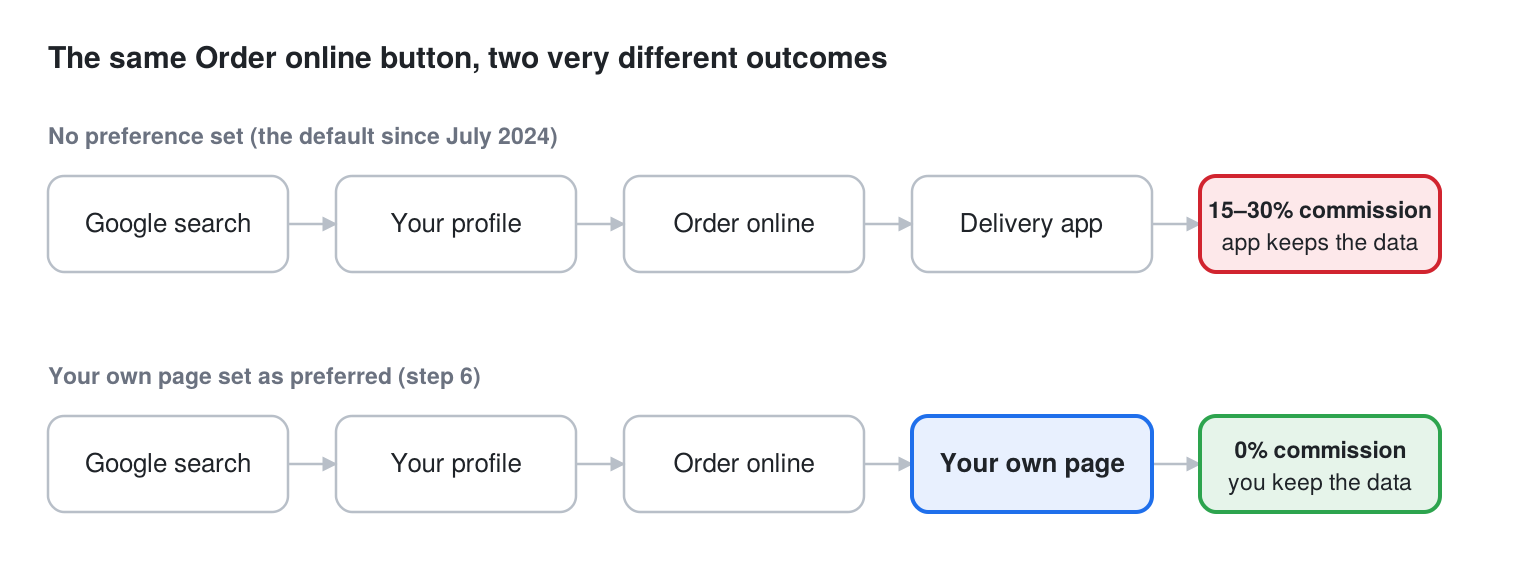
The top path is what most profiles do today. The bottom path is a five-minute change, and it is the single biggest margin decision on the whole checklist.
The checklist, part two: earn the ranking
Add photos every week, not once at setup
Profiles with recent photos get more direction requests and calls than profiles with one old batch of photos, and Google says businesses with photos receive more website clicks. Recency matters as much as volume. Aim for a baseline of 30 to 50 photos, mostly food, plus interior, exterior with signage, and staff, then add two or three new ones every week. Daylight, phone camera, dish filling the frame. Name the files before uploading (chicken-shawarma-plate.jpg, not IMG_4412.jpg). Choose a cover photo you’d put on a billboard, because that’s what shows in the Map Pack.
| Photo type | Starting set | Why it matters |
| Food and drink | 20+ | Decides the click; shows in dish searches |
| Exterior with signage | 3–5 | Confirms the location at a glance |
| Interior and seating | 5–8 | Answers “is it a sit-down place?” |
| Team | 2–3 | Builds trust; Google favors it for “people” |
| Menu board or printed menu | 2 | Backs up the Menu editor |
Fill in every attribute that applies
Attributes are the yes/no details Google lets you check off, and they double as the filters people tap in Maps: outdoor seating, wheelchair accessible, serves vegetarian dishes, accepts credit cards, good for groups, has Wi-Fi, LGBTQ+ friendly, women owned. Each unchecked attribute is a filter you fail. Go through the full list and set every one that’s true. Dining options (dine-in, takeout, delivery, curbside pickup) are the ones that most often move a listing into or out of a filtered search.
Reply to every review within 48 hours
Reviews are the biggest factor in how established Google thinks you are, and they are the first thing a customer reads after the star rating. Reply to all of them, including the five-star ones. For negative reviews, acknowledge the specific issue, say what changed, and invite them back; never argue and never post a form letter. Rancho Steve’s Pizza in Walnut, CA went from invisible to the top of local results within six weeks of cleaning up its profile and review responses, and foot traffic rose with it. Ask for reviews at the register, on the receipt, and in the order-confirmation email. Never buy or incentivize them.
Post an update once a week
Google Posts are short updates you publish on your profile, like a social media post, and each one stays visible for seven days. A weekly post, a new dish, a weekday special, a catering reminder, a holiday menu, tells Google the business is active and gives searchers a reason to pick you today. Each post can carry a button: Order online, Call, Learn more. Point the order button at your own ordering page, not a delivery app. Keep it short, add a photo, and don’t let the profile go more than two weeks without one.
Seed the Q&A section yourself
Anyone can ask a question on your profile and anyone can answer, including a competitor or a bored stranger. Get ahead of it. Post and answer the eight to ten questions your staff hears every day: Do you take reservations? Is there parking? Gluten-free options? Catering? How far do you deliver? Those answers show up in search for the questions people actually type.
Tag your links and check the numbers monthly
Add a small tag (called a UTM tag) to the end of your website, menu, and ordering links (utm_source=google&utm_medium=gbp) so your website analytics show which visits came from Google; your web designer or Innowi can set this up in minutes. Then once a month, open the Performance section of your Google profile and look at four numbers: how many people found you by name versus by category, how many tapped directions, how many called, and how many clicked your ordering link. If direct ordering clicks aren’t rising month over month, step 6 is the first thing to recheck.
The checklist at a glance
Print this, pin it by the office computer, and tick the right-hand column as a habit.
| Step | First time | Upkeep |
| 1. Claim and verify | 1 hour, then wait | Once |
| 2. Primary category | 10 min | Review quarterly |
| 3. Name, address, phone everywhere | 2 hours | Review quarterly |
| 4. Hours and holidays | 20 min | Monthly |
| 5. Menu link + Menu editor | 1–2 hours | Every menu change |
| 6. Preferred ordering link | 5 min | Verify monthly |
| 7. Photos | 1 hour | 2–3 per week |
| 8. Attributes | 20 min | Quarterly |
| 9. Review replies | 10 min | Daily |
| 10. Posts | 15 min | Weekly |
| 11. Q&A | 30 min | Quarterly |
| 12. Tracking and performance | 30 min | Monthly |
Five mistakes that keep restaurants out of the Map Pack
The ordering button goes to a delivery app. The most common one, and the most expensive. A restaurant can do everything else right and still pay 15 to 30 percent on every order its own Google listing sends out. Open Food ordering and check where the button points today.
The menu link is a PDF, or a delivery app’s menu. Google can’t read dishes out of a PDF to match a search, and a third-party menu page sends the click, and the customer, somewhere else.
A vendor owns the profile. If a marketing agency, website vendor, or POS company verified the profile under their account, you can lose posting access, review replies, and the ordering link the day you cancel. The restaurant owns the profile and shares it with vendors as managers, never the reverse.
Nobody answers reviews. A wall of unanswered one-stars tells both Google and the next customer that nobody is home. A two-sentence reply changes that impression more than a new photo does.
Hours are wrong on the day it matters. Thanksgiving week, Super Bowl Sunday, the Monday after a holiday. Set special hours a month ahead and the warning goes away.
What to expect, and how long it takes
Most restaurants see movement within four to eight weeks of completing the checklist, and the first changes show up as more direction requests and calls rather than more website visits. Three Innowi restaurants, in their owners’ own words:
| Restaurant | What changed | What the owner saw |
| Rancho Steve’s Pizza, Walnut | Profile cleanup and review responses | Top of local results in about six weeks; foot traffic up |
| Thai Soul | Had a website nobody could find; profile fixed | More calls, more direction requests, more “we found you on Google” |
| Mr. Falafel | Profile connected to a clean, fast ordering page | New customers saying they found the restaurant online within two months |
The common thread is that the profile work pointed at an ordering page and a website the restaurant owns, so every customer Google sent became a customer the restaurant could reach again. A profile that points at a rented website or a delivery app produces the opposite: more visibility, and none of the data.
Frequently asked questions
How do I add my restaurant menu to Google?
Open your profile at business.google.com, choose Edit profile, and find the Menu section. Paste a link to the menu page on your website in the Menu link field, then use the Menu editor to add your top dishes with prices and photos so they display inline.
Why isn’t my restaurant showing up on Google Maps?
The usual causes, in order: the listing isn’t verified, the primary category is too generic, your name or address doesn’t match other sites, or the profile has almost no photos or reviews. Steps 1 through 3 fix most cases.
How many photos should a restaurant have on Google?
A baseline of 30 to 50, with new photos every week. Food should be the majority. Recency is a signal, so a steady trickle beats a one-time upload.
How often should I post on Google Business Profile?
Once a week. Posts expire after seven days, so a weekly cadence keeps one live at all times.
Can I remove DoorDash or Uber Eats from my Google listing?
Yes. In the Food ordering section, select the provider and choose Remove link. Google requires the provider to process it within five business days. Set your own ordering page as the preferred link at the same time.
Does responding to reviews help ranking?
Google says responding to reviews shows you value customers and can improve visibility. In practice, review count, average rating, recency, and response rate all shape how established you look to Google.
How long does this take to work?
Four to eight weeks for most independent restaurants, assuming the listing is verified and the category and name are correct. Reviews and photos compound from there.
Your profile should send customers to you, not to an app
Everything in this checklist is free and most of it takes an afternoon. The one piece that depends on what’s behind the profile is step 6: a direct ordering link only helps if you have a commission-free ordering page and a website you own to put it on. That’s what Innowi’s marketing suite handles alongside the profile work itself: Google Business Profile setup and upkeep, review management, and the branded website and online ordering that turn a Google search into a customer whose data you keep.
Want us to look at your profile and show you where the orders are leaking? Book a free demo or call (510) 588-7102. A real person answers.