Counter order vs. kiosk order: where mistakes enter.
Ask a cook why a plate came back and the answer is almost never “I made it wrong.” It’s “the ticket said no onions” when the customer said extra onions, or “the ticket didn’t say anything” about the allergy the customer mentioned at the counter. The kitchen made what it was told. The mistake happened earlier, in the fifteen seconds between the customer’s mouth and the cashier’s fingers.
A self-service kiosk removes that fifteen seconds. The customer taps their own modifiers, and if the kiosk is wired to the kitchen display, the exact thing they tapped is the exact thing the line sees. No hearing, no typing, no shorthand. This post is about why that one connection matters more than either piece of hardware on its own, and what has to be true for it to work.
Where mistakes actually enter an order
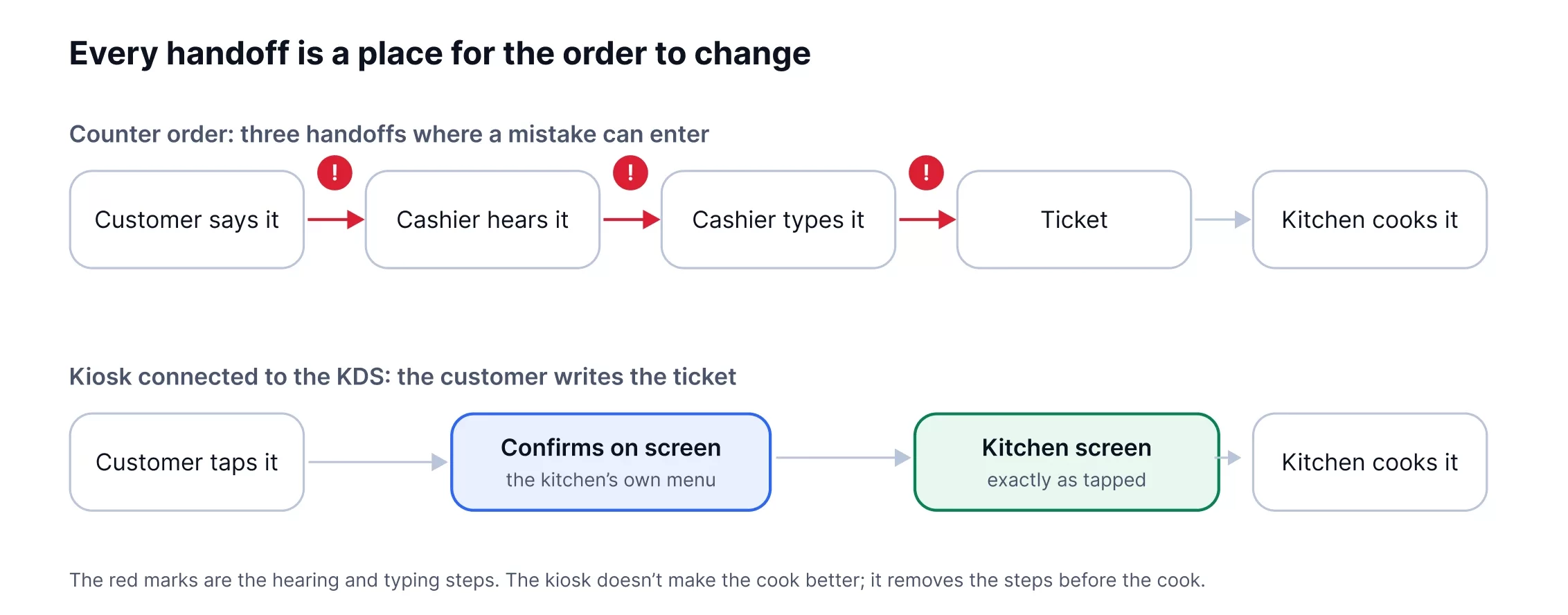
A counter order passes through four handoffs before it’s cooked. Each one is a place for the order to change.
| Handoff | What goes wrong | How often |
| Customer says it | Mumbles, changes their mind mid-sentence, says “the usual” | Constant, and nobody’s fault |
| Cashier hears it | Noise, accent, a line forming, “no pickles” heard as “more pickles” | The biggest single source of errors |
| Cashier types it | Wrong button, modifier on the wrong item, free-text note the kitchen can’t read | Common at rush, worse with new staff |
| Kitchen reads it | Printed shorthand, smudged ticket, a note that scrolled off the screen | Covered in our earlier KDS post |
A kitchen display system fixes the last row. A kiosk fixes the first three, because the customer is the only person in the chain who knows what they want, and the kiosk lets them write it down themselves. (The kitchen side is covered in The Real Cost of Order Mistakes.)
What changes when the kiosk writes the ticket
Modifiers are chosen, not described. “Can I get it kind of spicy but not too spicy” becomes a tap on Medium. The customer picks from the same list the kitchen cooks from, so there’s nothing to interpret.
Modifiers stay attached to their item. On a four-item order typed by a cashier, “no cheese” has a way of landing on the wrong burger. On a kiosk the customer is inside one item when they change it, and the ticket shows the change under that item and nowhere else.
Allergies get a field, not a Post-it. A kiosk can ask. A cashier at rush often doesn’t, and when the customer volunteers it, it becomes a handwritten note or a free-text line the kitchen may not see. On a connected kiosk the allergen flag rides the ticket onto the screen in red.
The customer confirms before the kitchen starts. Every kiosk shows a summary before payment. It’s the one moment in the whole order where the person who knows what they want reads back what the kitchen is about to make. At a counter, that read-back is the cashier’s job, and at 12:15 on a Friday it gets skipped.
Nobody is typing under pressure. The cashier’s error rate rises with the length of the line. The kiosk’s doesn’t. Six kiosks at lunch are six customers entering their own orders at their own pace, and the line behind them is shorter because of it.
The catch: a kiosk that doesn’t talk to the KDS just moves the problem
Here is where a lot of restaurants lose the benefit. They buy a kiosk from one vendor, a KDS or printer from another, and connect them through the POS, an integration, or in the worst case a tablet at the pass that someone re-enters orders from.
Every one of those joints is a new handoff, and every handoff is a place for the order to change. A kiosk order that prints as a paper ticket has just put the customer’s careful tapping back into the smudged-paper problem. A kiosk that sends to a separate tablet has put a human re-typer back in the chain. A kiosk connected through a third-party integration will drop a modifier the day the integration updates, and nobody will know until the plate comes back.
The benefit only shows up when the kiosk and the kitchen screen are the same system: one menu, one modifier list, one database, so what the customer sees on the kiosk and what the cook sees on the screen are the same record with nothing in between. That’s an architecture question, not a feature, and it’s worth asking any vendor directly: when a customer taps a modifier on your kiosk, what exactly happens between that tap and the kitchen screen? If the answer has more than one step in it, that’s where your mistakes will live.
What it looks like on the line
Omega Burgers put in Innowi kiosks and found that customers ordered more when nobody was watching them scroll: the kiosk sells the add-on the cashier is too rushed to mention. Burger Barn saw the same lift in average ticket. Both run the kiosk and the kitchen screen off the same platform, so the order a customer builds is the order the line cooks, modifier for modifier.
The part owners mention less often, because it’s harder to see, is what stops happening. Fewer plates walk back. Fewer “did they say no mayo?” shouts across the pass. The expo stops acting as a translator between the register and the grill. On a Friday night that’s the difference between a kitchen that’s busy and a kitchen that’s behind.
Setting it up so it actually works
A connected kiosk is only as accurate as the menu behind it. Four things to get right before you switch it on:
- One modifier list, written for the kitchen. The option the customer taps should be worded the way the cook thinks. “Light sauce” on the kiosk should print “LIGHT SAUCE” on the screen, not “sauce: reduced.”
- Required choices, not optional ones. If a dish needs a protein or a spice level, make the kiosk ask. An unanswered question becomes a guess at the pass.
- Allergen flags that route to every station. An allergy noted on a burger has to show on the fryer screen too. Check that your routing carries the flag, not just the item.
- Kiosk orders tagged on the screen. The line should be able to tell a kiosk ticket from a counter ticket at a glance. When a plate comes back, you want to know which path it took, because that tells you where to fix the menu.
Frequently asked questions
1. Do self-service kiosks reduce order errors?
Yes, when the kiosk sends the order directly to the kitchen screen. The customer chooses their own modifiers from the kitchen’s own list and confirms before paying, which removes the hearing and typing steps where most counter errors happen. A kiosk that prints a paper ticket or feeds a separate tablet keeps those errors in.
2. Can a kiosk connect to a kitchen display system?
It depends on the vendor. The reliable setup is a kiosk and KDS from the same platform, sharing one menu. Integrations between different vendors work until one side updates.
3. What about customers who don’t want to use a kiosk?
Keep the counter. Most restaurants run both, and the kiosk takes the longer, more customised orders while the counter handles “a coffee and a croissant.” Both paths should land on the same screen.
4. Does a kiosk slow down the line?
Usually the opposite. Three customers at three kiosks are ordering at once; one cashier serves one at a time. Average order time per customer is a little longer; total throughput is higher.
5. Do kiosks increase average order size?
Across published studies, by roughly 12 to 30 percent, mostly from add-ons the customer chooses without being asked. Innowi restaurants have seen lifts in that range.
The order the customer builds should be the order the kitchen cooks
That’s the whole idea, and it’s only true when nothing sits between the kiosk and the screen. Innowi’s self-service kiosk and kitchen display system run on one platform with one menu, so a modifier tapped at the front is the modifier shown at the pass. Order online, at the counter, or at the kiosk, and the line sees it the same way.
Book a demo or call (510) 588-7102 and we’ll walk through your menu’s modifiers with you before anything goes on a screen.