Your menu is the only piece of marketing every single customer reads before they pay. Most restaurants treat it as a price list. The ones with higher average checks treat it as a sales tool, and the format it lives on, a screen above the counter or a sheet of paper in the customer’s hand, changes what people order.
This isn’t a “digital good, paper bad” post. Both formats have jobs the other can’t do, and plenty of restaurants should run both. Here is what each one does to your check, five menu psychology moves that work on either, and how one Innowi restaurant uses the two together.

Where each format wins
| Digital menu board | Printed menu | |
| Best for | Counter service, drive-thru, kiosks, lines | Table service, bars, long menus |
| Price change | Seconds, synced from the POS | Reprint, or a sticker nobody trusts |
| Breakfast vs. dinner menu | Switches itself at 10:30 am | Two printed versions, or one crowded one |
| Promotions | Rotate a special every few minutes | Table tent or a server mention |
| Reported effect on average check | +3% to +5% at McDonald’s U.S. locations after rollout; +10% to +15% upsell lift when high-margin items are actively featured | No measured lift from the format itself; the lift comes from layout and pricing |
| Ongoing cost | Hardware once, then nothing | $2,000 to $10,000+ a year in reprints |
| Weak spot | Food photos that don’t match the plate; too many items per screen | Prices lag behind costs; specials can’t change |
Figures: McDonald’s rollout and QSR Magazine upsell analysis, as summarized by Evergreen.
Five menu psychology moves that work on a screen or on paper
The format matters less than what you put on it. These five changes cost nothing on a printed menu and about ten minutes on a digital one.
- Drop the dollar signs. A Cornell study of restaurant guests found that prices written as “14” instead of “$14.00” led to noticeably higher spending, because the symbol reminds people they’re paying. Write the number, no symbol, no trailing zeros.
- Put your two best-margin items where eyes land first. On a printed menu that’s the top right of the right-hand page. On a screen it’s the top of the center panel. Most menus put the cheapest item there because it was added first.
- Use a decoy. One premium item priced noticeably above the rest makes the dish next to it look reasonable. Nobody has to order the 32 platter for it to sell more 22 platters.
- Cap the choices. Seven items per category on paper, five or six per screen on a board. Past that, people default to the thing they always get, which is usually not your best seller for margin.
- Describe, don’t list. “Grilled chicken” sells less than “Charcoal-grilled chicken thigh, lemon, sumac onions.” Two extra words of specificity per item, no adjectives like “delicious.”
What only a digital menu board can do
Dayparting. The board shows breakfast until 10:30, lunch combos until 3, then dinner and family packs. Nobody on your team touches it. A printed menu either crams all three onto one sheet or forces a swap your staff forgets on busy days.
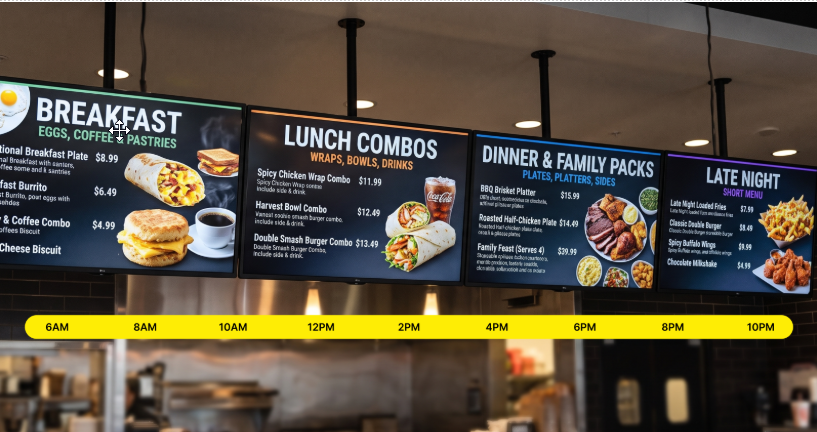
A dayparted board over one service day.
Price changes that keep up with costs. When chicken goes up on Tuesday, your board reflects it Tuesday. If the board is synced to your POS, the price on the screen, the kiosk, and the receipt are the same number, which is the thing customers notice when it’s wrong.
A special that actually moves. Rotate a high-margin item into the featured slot for three minutes every ten. On paper the special is a table tent that’s been there since March.
Fewer wrong orders at the counter. When the cashier and the customer are looking at the same screen, “the chicken one” becomes “the Charcoal Chicken Plate, number 4.” That’s a shorter line and fewer remakes, the same problem our KDS post covers from the kitchen side.
What printed menus still do better
A screen above a counter is read standing up, in about eight seconds, by someone who’s already decided to eat here. A printed menu is read sitting down, over a drink, by someone deciding how much to spend. That’s a different job.
Paper wins for full-service dining, wine and cocktail lists, tasting menus, and anything a guest wants to hold and discuss. It also wins on feel: heavy stock and a clean layout signal that the food is taken seriously before it arrives. And it never crashes at 7 pm on a Friday.
The mistake isn’t choosing paper. It’s printing a menu with the same layout as the last one, with prices that haven’t been reviewed in a year, because reprinting is a hassle. If you run paper, review it quarterly, and keep a single master file so the print menu, the website menu, and the Google menu all say the same thing. Google now reads your menu straight from your profile; see step 5 of the Google Business Profile checklist.
One brand, two formats: Koftegi Grill & Bakery
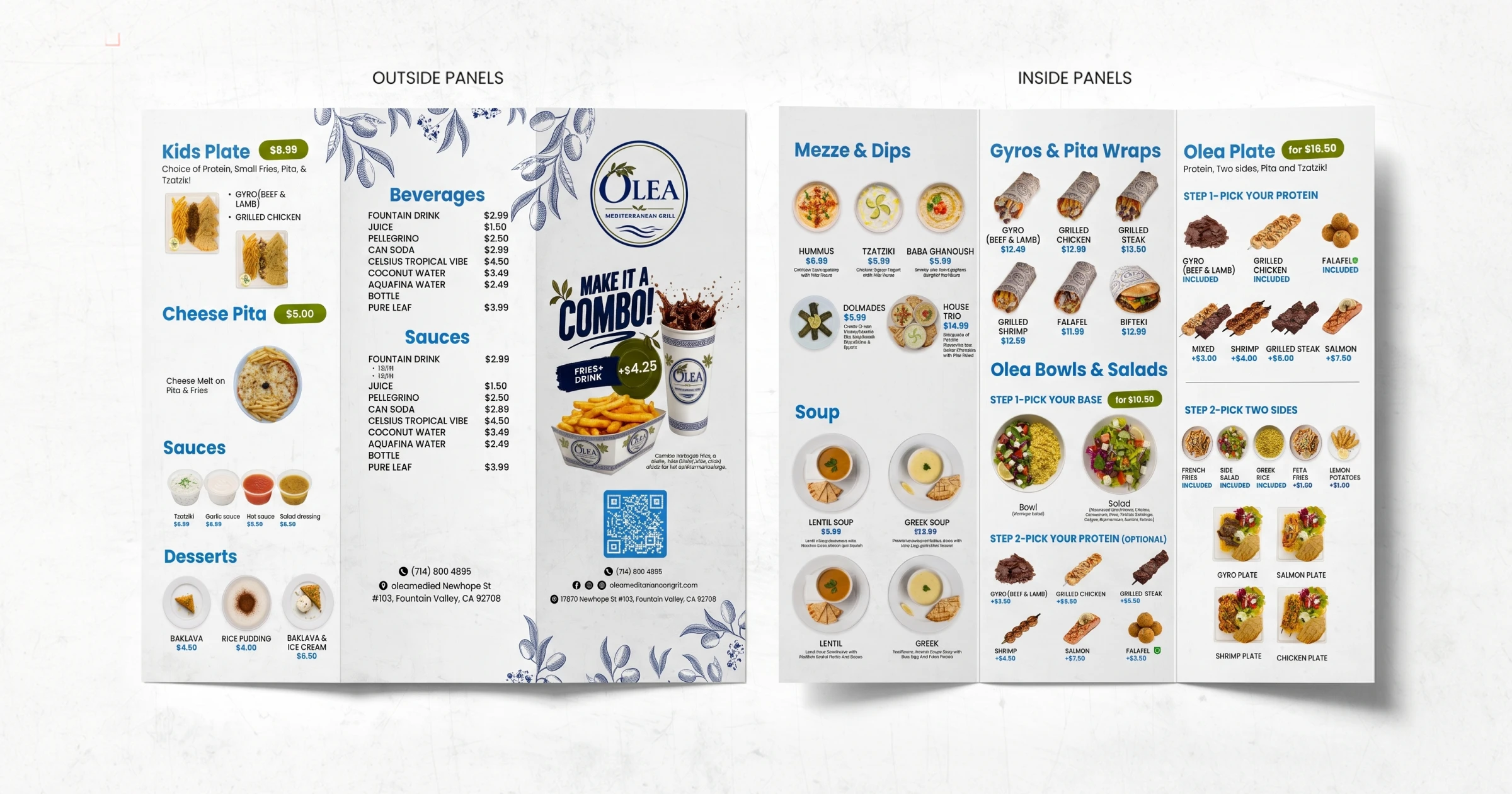
Koftegi runs both. A TV menu board above the counter carries the core menu, dayparted for lunch and dinner, with the day’s bakery items in the featured slot. Printed menus on the tables match it exactly: same item names, same order, same prices, same photography style, because both are built from one menu file.
The owner’s own read on it: the menus are “clear, visually appealing, and customers find them easy to read,” and the restaurant gets compliments on them regularly. That’s the outcome that matters. A customer who can read the menu quickly orders faster, orders more confidently, and is more likely to add the thing you put in the featured slot.
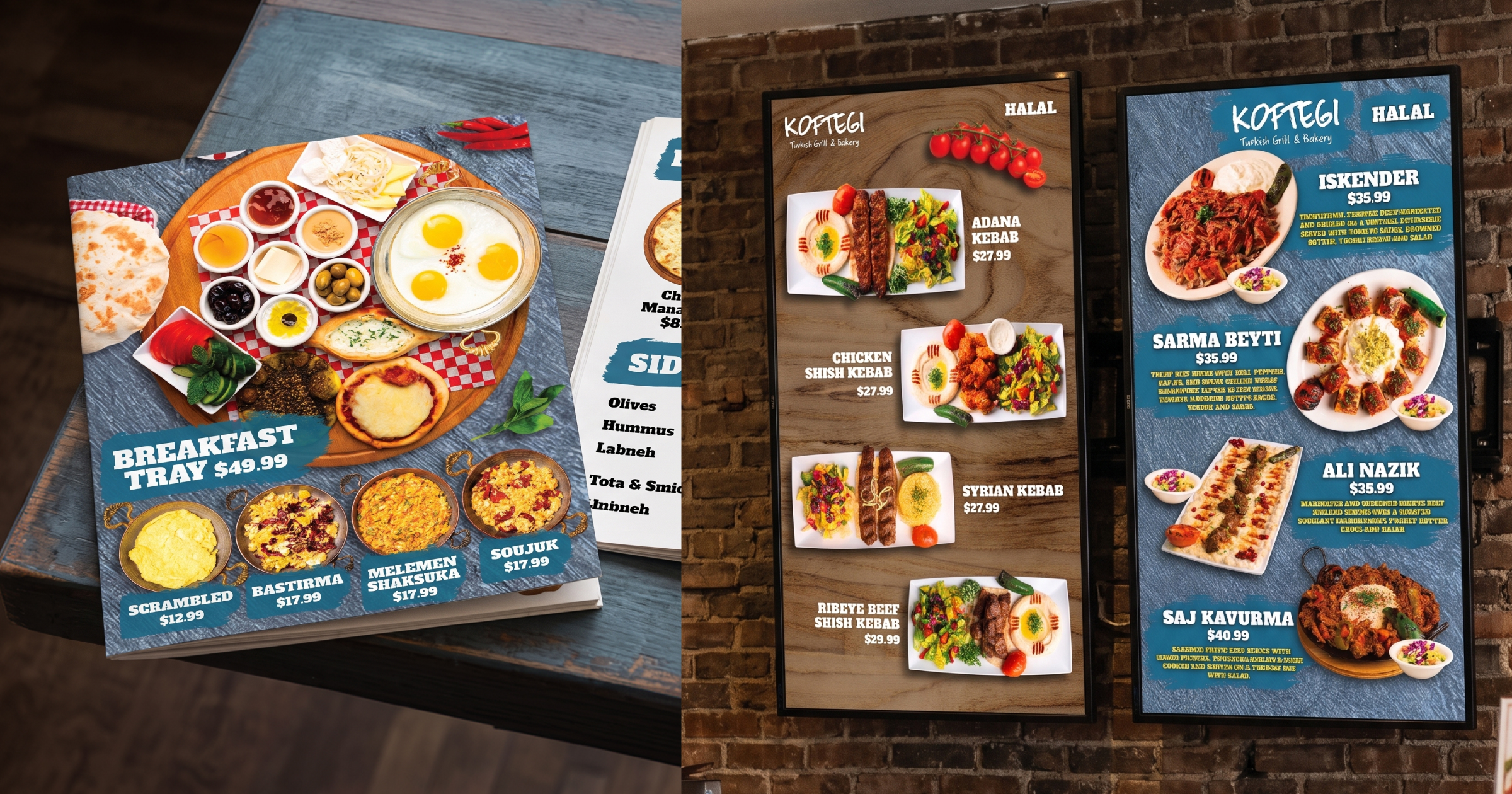
Koftegi’s TV board and printed menu, side by side
Frequently asked questions
Do digital menu boards increase sales?
The format alone doesn’t. What increases sales is what the format makes easy: featuring high-margin items, changing prices on time, and showing the right menu at the right hour. Chains that did those things on digital boards have reported 3 to 5 percent higher average tickets and 10 to 15 percent better upsell rates.
Should I remove dollar signs from my menu?
Yes, on both formats. Write “14” rather than “$14.00.” It’s the cheapest change on this list and the most consistently supported by research.
How many items should be on a restaurant menu?
About seven per category on paper, and five or six per screen on a board. More than that and customers stop reading and order what they always get.
What is menu dayparting?
Showing a different menu at different times of day, breakfast, lunch, dinner, late night, so the board matches what the kitchen is actually making. Digital boards do it automatically; printed menus need a separate sheet for each.
Can I run a digital board and a printed menu at the same time?
Yes, and many restaurants should. Keep both built from the same master menu so names, prices, and order never drift apart.
Start with the menu you already have
Before buying a screen, run the five moves above on your current menu. Drop the dollar signs, move your best-margin items to the top right, add a decoy, trim each category, rewrite the descriptions. That’s a weekend of work and it lifts the check on paper or on glass.
When you’re ready for a board, the thing to insist on is that it pulls prices from the same place your POS and kiosk do. Innowi’s digital menu boards sync straight from the restaurant POS, so a price changed once is right everywhere, and the design team builds the TV and paper versions to match, as they did for Koftegi. Book a demo or call (510) 588-7102 to see one running.